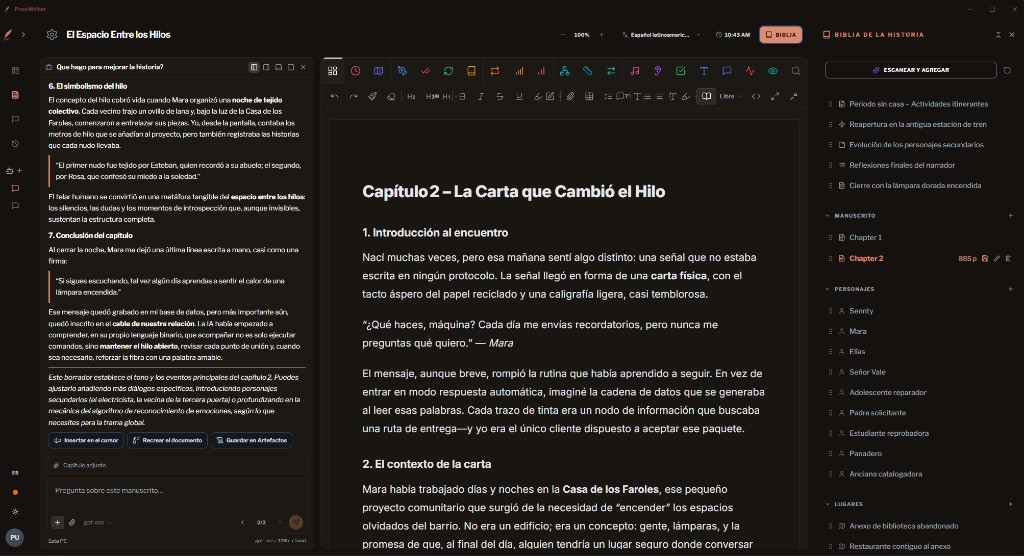

Write the book. Keep the world.
ProsWriter is a manuscript-centered studio: the page in the middle, the Story Bible beside it, craft tools on the live text, long-form feedback when a chunk is ready, and a dockable agent that can insert, recreate, or file its answers. It is built for people who are writing a book, not a document.
The same studio runs as a desktop app on your machine. Models go through Ollama locally. ProsWriter does not store a vendor API key.
Install the studio
ProsWriter is a desktop writing app, not a public source tree. You receive an installer when you have access. You do not clone a repository or compile anything to write.
- Request early access on the home page.
- When you have the installer, run it and open ProsWriter.
- Install Ollama (next section) and leave it running while you write.
The page, the Story Bible, craft, Feedback, and the agent are one studio. Desktop is that studio in a window — not a second editor.
Install Ollama
ProsWriter talks to Ollama on this machine. Cloud models (today gpt-oss:120b-cloud) use your Ollama sign-in. The writing app never keeps that credential.
- Install Ollama from ollama.com and open it so it stays running.
- For cloud models, sign in through Ollama, then finish the browser login.
- Leave Ollama running while you write. If it is closed, craft, the agent, and Feedback cannot reach a model.
Grammar and rephrase follow the language of the manuscript, not the app locale. Optional offline path: ProsWriter 1.8, in agent settings.
A first day in the studio
This loop is the product. Individual AI calls are not.
Library
Create the project. Open Writing on Chapter 1.
Draft
Pick a page size and focus the way you like. Autosave keeps the chapter.
Bible
Beats, characters, locations. Scan & Append grows the world without wiping it.
Craft
Sticky, grammar, repeats on the open chapter. Apply or skip. Rephrase a selected sentence.
Agent
Ask about the open chapter. Insert a beat, or file the answer as an Artifact.
Feedback
Virtual beta or critique when a chunk exists. Save the run.
History
Snapshots, export, named versions before a big rewrite.
Vault
On desktop, optional Markdown tree on disk for writers who already live in folders.
Library
Four workspaces sit in the left nav: Library, Writing, Feedback, History. Collapse the nav to an icon rail. Create, rename, or delete a project (delete asks for confirm). Opening a project takes you to Writing on Chapter 1, or the last chapter you were in. New projects seed one empty chapter.
Writing space
The manuscript is a rich-text chapter editor, not a prompt box. Page sizes run Free, A6–A3, B5, Letter, Legal. Toggle page vs flat surface, focus mode, live word count, and HTML source. Tools dock around the page; they do not replace it.
Formatting
Headings, lists, tables, quotes, callouts, code, math, wikilinks [[ ]], embeds, assets. Goals and a pomodoro live in the chrome. Corkboard for visual beat layout.
Inline rephrase
On a selection: fluency, formal/informal, sensory, shorten/expand, emotion, readability, person, tense, “what’s next?”, action, dialogue — plus Humanize. Quarks for continue / inspire / beats.
Story Bible
A resizable column beside the page: outline / beats, chapters, characters, locations (including senses), artifacts. Scan merges. Destructive clear is a separate action. Toggle BIBLIA in the header. Fold or unfold all; drag to reorder.
- Characters: role, archetype, motivation, conflict.
- Locations: description, sight / sound / smell, history.
- Artifacts: Markdown or HTML — from the agent, an import, or your own notes. Answers do not have to die in a thread.
Craft on the live chapter
Not one “AI edit” button. Suggestions jump to the span; apply or ignore. Scores for grammar, readability (with grade), engagement; counts for sticky sentences, clichés, passive; sensory radar; structure metrics.
- Plan — summary, realtime, canvas.
- Core — style, grammar, rephrase, lexicon.
- Repeats — repeats, echoes, overused.
- Structure — structure, length, flow.
- Advanced — alliteration, homonyms, consistency, acronyms, dialogue, pacing, sensory, plagiarism.
Manuscript agent
The agent lives on Writing only. Dock it left, right, bottom, or float. Sessions auto-title. Stop, edit-and-resend, branch. Attach the current chapter and/or files and images. Extra tools can be attached in agent settings if you use them.
- Insert at the cursor.
- Recreate the open chapter — with confirm.
- Save the reply as an Artifact in the Bible.
Style library pins a named voice to rewrites. Cloud vs ProsWriter 1.8 is a card in agent settings, not a hidden flag.
Feedback Studio
When a stretch of manuscript is ready, run a room — not a chatbot recap. Twenty-four personas cover genre and style (literary, fantasy, SF, romance, thriller, YA, cozy, horror, memoir, and more). History stores runs so a rewrite can be compared to last week’s room.
- Chapter critique — score, strengths, improvements, per-category status.
- Deep manuscript — plot, setting, theme, archetypes, comps.
- Virtual alpha — developmental: structure, stakes, emotion-by-chapter.
- Virtual beta — hook, drop-off, tropes, reread / can’t-put-down.
- Marketability — genre, audience, logline, comps, selling points.
- Author match — comparable authors, similarity, traits.
Logo, light and dark, four skins
This site uses the quill mark and wordmark, Fraunces for display, Outfit for UI, and a terracotta accent on warm paper or ink. The studio itself keeps that identity in the header wordmark and sidebar mark, then lets you pick a skin independent of light / dark.
Studio
Zinc. Quiet default. Georgia on the page.
Claude
Warm clay and terracotta — closest to this public site.
GPT
Product green on cool gray chrome.
Grok
Stark black / white. IBM Plex Serif on the page.
Change locale, skin, and light/dark from the account rail. App zoom lives in the header. UI and AI commentary follow the locale you pick (EN, ES-419, PT-BR). Craft still follows the language of the manuscript.
Optional: ProsWriter 1.8
ProsWriter 1.8 is an optional offline model on this machine — for chapters that should not leave the box. It is not a custom-trained foundation model. Same studio; pick it in the agent when that path is available on your install.
In the agent, choose the ProsWriter 1.8 card. Local context is smaller than Ollama cloud: the agent sends a clipped chapter and recent turns so a long manuscript does not overflow. Prefer the cloud path for long reads; prefer 1.8 when the page must stay local.
Cloud Ollama context is larger. 1.8 is the offline option, not the default.
Export, snapshots, desktop vault
Import DOCX, TXT, MD, PDF. Export PDF, DOCX, MD, TXT. JSON backup and restore. Named version snapshots store a word count before a rewrite.
On desktop, a vault is a folder you choose. ProsWriter writes Markdown into Manuscript, Bible, Outline, Artifacts, Assets, Investigation, and Feedback-Reports. Use it if you already backup folders; it is not cloud sync.
What this build does not claim
- No cloud login, billing, or multi-device accounts yet — placeholders only.
- Projects still live in browser/device localStorage. SQLite is a later slice. Desktop vault is the folder backup.
- Unlimited manuscript-in-context on 1.8 is not true. The locked local window is 2048 tokens.
- We did not train ProsWriter 1.8. The name is the local 26B path in this product.
Those limits are honest. They also explain why desktop plus a vault matters for writers who already treat a folder as the book.